Supported data types
Igor native loaders
These file types are loaded natively by Nika and are available on all platforms:
tif — TIFF file; assumed to be a single-layer scientific TIFF (not color).
GeneralBinary — Flexible binary data loader. See description.
Pilatus — Loads non-compressed Pilatus data. Opens an additional panel with options. As of version 1.66, also handles compressed (BYTE_OFFSET) CBF files. See description.
Nexus — HDF5-based format used at APS, Diamond, and other facilities. Used at 9ID SAXS/WAXS, 15ID SAXS, and others. Stores extensive metadata accessible via wave notes. See the NeXus chapter in this manual.
HDF5 — Under development. The HDF5 format is highly flexible, which makes writing a generic loader difficult. If you have HDF5 data from a specific instrument that Nika does not yet support, please send an example file for testing.
BrukerCCD — Bruker SMART CCD software format.
mpa — MPA-NT (MPANT) version 1.48 format from FAST ComTec. Used with the MPA-3 dual-parameter multichannel analyzer and Molecular Metrology (Rigaku/Osmic) multiwire 2D gas-filled X-ray detectors.
DND/txt — Loader for DND CAT (APS) data. Raw data are TIFF files, but Nika reads an associated text processing record to extract reduction parameters and reprocesses the 2D data. See the DND CAT section in the Instrument Support chapter.
mp/bin — MP binary format. Contains a header followed by binary data.
mp/asc — MP ASCII format. A single column of data; assumes square images (N × N pixels).
BSRC/Gold — BESSRC 1536×1536 Gold detector binary format. Contains a header and 16-bit binary data.
RIGK/Raxis — Rigaku file format “86”. Handles arbitrary image sizes; tested on 1k×1k and 1.5k×1.5k images. Based on the Rigaku C-code reference implementation and verified against Fit2D output. Note: the newer Raxis format “100” is not yet supported.
ADSC — Binary file with header. Header begins with HEADER_BYTES.
WinView — SPE Princeton WinView file format.
ASCII — ASCII matrix format. If the file extension is .mtx, the code
looks for an accompanying .prm file and reads parameters from it into the
appropriate Nika variables.
ASCII (512×512) — Single-column ASCII data for 512×512 pixel images.
Ibw — Igor binary wave format. Useful when data are produced by Igor Pro.
BSL/SAXS and BSL/WAXS — BSL/OTOKO file format. See
http://srs.dl.ac.uk/ncd/computing/manual.bsl.html for format details. Requires
at least three files: Xnn000.mdd (header), Xnn001.mdd (SAXS images)
with Xnn002.mdd (calibration), and optionally Xnn003.mdd (WAXS images)
with Xnn004.mdd (calibration). The set appears as a single entry in the
file list. Without the header file, the loader fails with an error.
Fuji/imp — Fuji image plate reader (BAS2000 and BAS2500). Supports 8-bit and 16-bit data. Only 8-bit data have been fully tested. If you have 16-bit data from a non-default configuration, send a sample file for testing.
ESRF/edf — ESRF ID2 “edf” file format. Should read other edf formats as well, but this has not been verified. Reads only files containing a single image per file — the format allows multiple frames per file, but multi-frame support is not implemented.
FITS — Flexible Image Transport System format (Hanisch et al., Astronomy & Astrophysics, 376, 359–380, 2001). May fail with files that do not follow the specific FITS variant tested. Usage in the SAXS community is unclear.
Mpa/UC — University of Cincinnati MPA file format.
SSRLmat — SAXS format used at the SSRL Materials Science SAXS beamline. For full support, use the dedicated SSRL Mat SAXS entry under Instrument Support.
TPA/XML — Format used by the Quokka SANS instrument at ANSTO (Australia). Additional support is available under Instrument Support.
GE binary — Used by GE area detectors.
BSL/SAXS and BSL/WAXS detail
The BSL container format can hold up to 5 associated files and contains additional information accessible through a dedicated panel:
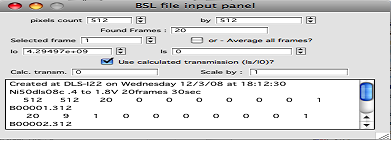
The top section shows the pixel dimensions of images in the container. In this example the container holds 512×512 images; 20 frames were found. You can process the average of all frames (check “Average”) or individual frames.
I₀ and Is are extracted from the associated calibration file. I₀ is the upstream ion chamber reading (incident flux / monitor); Is is the downstream reading. When both are present, the transmission Is/I₀ is calculated and displayed in “Calc. transm.”. If Is is not recorded, the calculated transmission will be zero.
If the two ion chambers have different sensitivities, or if Is comes from a different detector type, apply a ScalingFactor to correct the Is/I₀ ratio.
I₀ is always transferred to Nika’s I₀ calibration value (used when “Use Monitor?” is selected). The “Use calculated transmission?” checkbox transfers the value of (ScalingFactor × Is / I₀) to Nika’s sample transmission field (used when “Use sample Transmission” is selected).
General Binary data loader
This is an interface to Igor Pro’s GBLoadWave function, customized for use
with Nika. Most parameters correspond directly to GBLoadWave arguments —
consult the Igor Pro manual for full details.
Selecting “GeneralBinary” as the image type opens the configuration panel. The configuration is shared across all Nika windows. The panel can be dismissed and reopened by reselecting the GeneralBinary type.
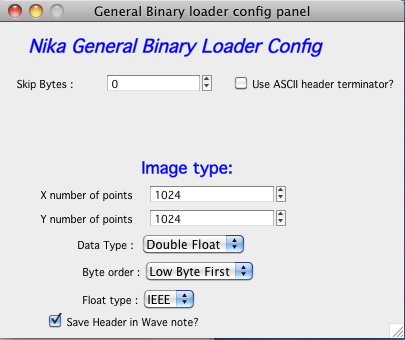
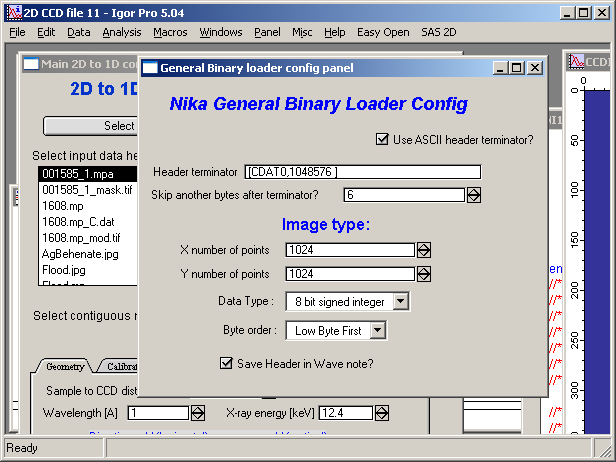
Top section: Enter the number of bytes to skip (fixed-length header), or check “Use ASCII header terminator” if the header ends with a known ASCII delimiter. Enter the delimiter string in the provided field. Only the first 40 KB of the file are searched for the terminator; for longer headers, use the byte- skip option instead. Additional bytes after the terminator can be skipped using the follow-on field.
Image type section: Set image dimensions (rows × columns), data type, byte order (for integer types), and floating-point format (IEEE or VAX). Refer to the Igor Pro manual for descriptions of these options. “Save Header in Wave Note” appends the skipped ASCII header to the wave note, which is propagated through Nika into the final output — useful for preserving instrument metadata.
Other loaders with panels
Some loaders require additional user input:
Panel-based (e.g., BSL/SAXS, BSL/WAXS) — Opens a control panel for selecting individual frames or computing averages when a file contains multiple images, and for accessing additional metadata.
Function-based (e.g., Fuji BAS2000/BAS2500) — For readers where data endianness may vary with hardware configuration, a note is printed in the history area with instructions for changing the endianness setting. This setting persists within the Igor experiment.
Pilatus
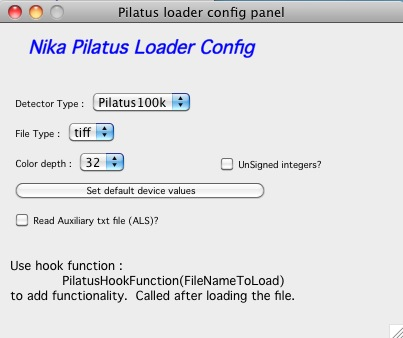
Supported formats: TIFF, EDF, IMG, CBF, and floating-point TIFF (used for background-subtracted images). Tested primarily with 100K images; 300K, 300K-W, 1M, 2M, and 6M formats are supported but less thoroughly tested. Also reads auxiliary TXT files from ALS.
“Set default device values” — Sets the pixel size to 0.172 mm (the pixel size for all current Pilatus detectors).
Note
A hook function named PilatusHookFunction("FileNameToLoad") can be
defined to run after each image is loaded. This function can read the wave
note (which contains the Pilatus file header) and extract instrument
parameters, or read an auxiliary text file. The function receives the
currently loaded filename as a string argument.
Calibrated 2D data files
EQSANS (ORNL) — Text file with four columns (Qx, Qy, Intensity, Uncertainty), 400×400 point map, generated by the EQ-SANS instrument at ORNL. This feature may be broken in version 2.75. Do not use until further notice — send sample files if you need this support restored.